I’ve watched three product teams in the last year ship tracking that looked fine on paper and returned unusable data in GA4. Every time, the root cause was the same: the tracking spec was written for analysts, not for the engineers who had to implement it. Event names without triggers. Parameters without types. Owners listed as “product team.”
A tracking spec that engineers actually implement is a short, boring document with zero ambiguity. It spells out the event, the trigger, the payload, and the person accountable — in language a backend developer can copy-paste into code. This guide walks through the anatomy, a before/after example, a four-gate review flow, and the checklist I use before any spec goes into a sprint.
Why Most Tracking Specs Fail
Specs fail for three reasons, and none of them are technical:
- They describe intent, not behavior. “Track when users sign up” leaves open which endpoint, which step, and whether OAuth counts.
- They skip types. A parameter called
plancould be a string, an integer, an enum, or all three depending on who implements it. - They lack an owner. When data looks wrong in Q2, nobody knows whether to ping product, analytics, or the developer who left in March.
I’ve been writing specs in a four-column Notion table since 2019 and reviewing specs from other teams via Segment’s tracking plan templates. The teams that ship clean data share one habit: they treat the spec as an engineering artifact, not a marketing wish-list.
The Anatomy of an Implementable Spec
Every row in your spec needs four blocks. Miss any block and engineers will guess — and their guesses will diverge from what reports expect.
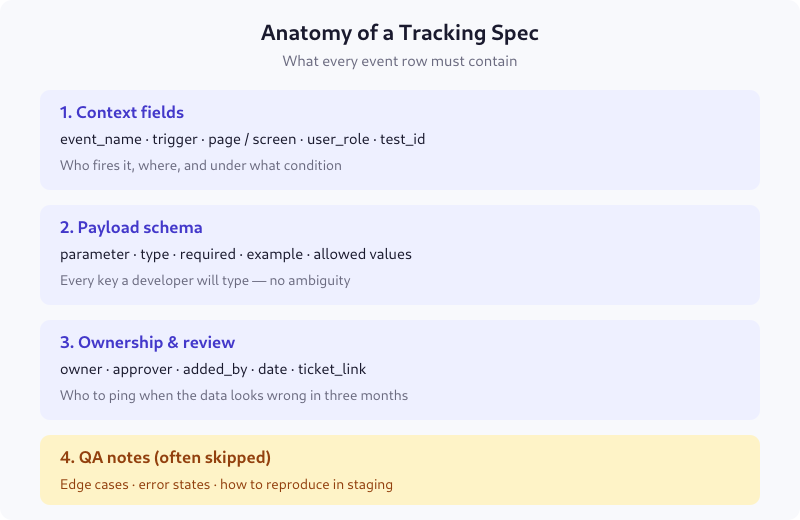
1. Context fields
Where and when the event fires. Minimum: event_name, trigger, page_or_screen, user_role. Add test_id if the event is part of an A/B test so you can filter experimental data out of baseline reports.
2. Payload schema
Every parameter with four attributes: type (string, integer, boolean, array), required (true/false), example (a real value), and allowed_values (an enum or range). If a parameter has 12 possible values, list all 12. “Any string” is not a schema.
3. Ownership and review
A named person, not a team. A ticket link, not a Slack thread. A date of last approval. I add added_by because tracking specs outlive the people who write them, and Git blame for a Notion page doesn’t exist.
4. QA notes
This is the block teams skip. Write down: what the payload looks like in staging, which edge cases produce empty values, and how to reproduce the event without touching production. Without this, QA becomes a synchronous meeting every release.
Vague vs Implementable: A Real Example
Here’s the same signup event written two ways. The left column is what I receive from product managers 80% of the time. The right is what I send back after the first review pass.
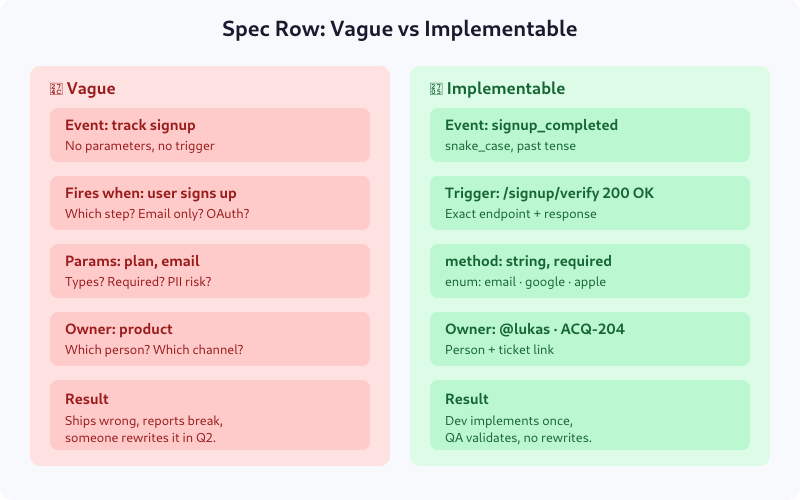
The vague version produces five separate clarification Slack threads. The implementable version produces code. The difference is about ninety minutes of spec-writing upfront — versus two weeks of back-and-forth and one rewrite later.
The 4-Gate Review Flow
Once you have the spec, it needs to pass through four reviewers. Each gate has one owner and one yes/no exit criterion. This is the process I put in place at an e-commerce client in 2022 that cut our tracking rework rate from roughly 40% to under 10% within two quarters.
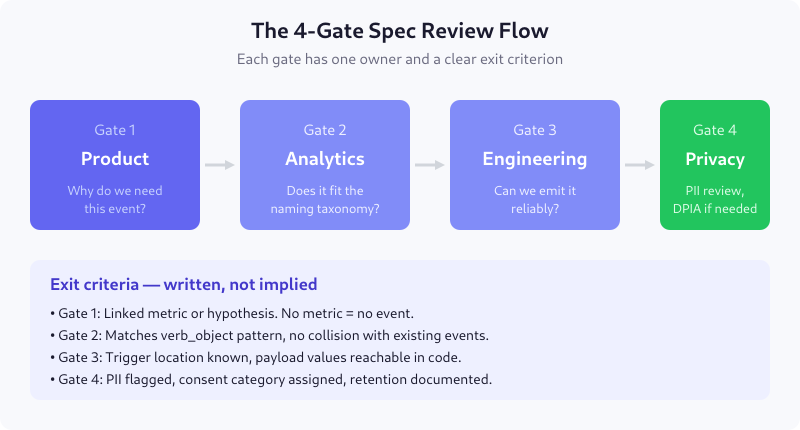
Gate 1 — Product: Why do we need this?
Owner: product manager. Exit criterion: the event is linked to a metric or hypothesis named in the spec header. No metric, no event. This kills half the “nice-to-have” events before they cost engineering time.
Gate 2 — Analytics: Does it fit the taxonomy?
Owner: analytics engineer. Exit criterion: the name matches your naming convention (see GA4 Event Naming Conventions for ours) and doesn’t collide with an existing event. Collisions are silent bugs — two events with the same name and different payloads pollute every downstream query.
Gate 3 — Engineering: Can we emit this reliably?
Owner: the developer who will write the code. Exit criterion: the trigger location is reachable, and every payload value can be computed at that point in the code. If plan_tier lives in a different microservice than the signup endpoint, you need a different trigger.
Gate 4 — Privacy: Is it compliant?
Owner: DPO or privacy lead. Exit criterion: all PII is flagged, a consent category is assigned (analytics, marketing, functional), and retention is documented. For European products, this also blocks the spec if a DPIA is required but not started.
The Ten-Item Pre-Merge Checklist
Before the spec merges into your canonical tracking plan, every row should pass these ten checks. I keep this as a PR template in the tracking-plan repo so review is mechanical, not subjective.
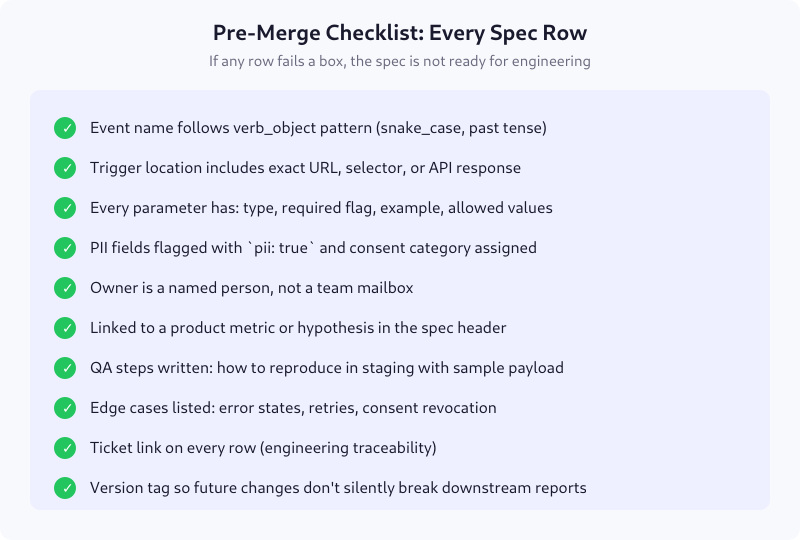
The version tag on the last line is what turns a static document into a changelog. When reports break six months later, you can diff v1.4 against v1.3 and find the commit that changed purchase to order_placed.
Where to Host the Spec
Tool matters less than discipline, but the format matters a lot. I’ve used four setups over the years:
- Notion database — good for small teams, poor for versioning. Export to CSV weekly if this is your choice.
- Google Sheets — accessible to non-technical stakeholders, but no type validation and no Git history.
- YAML in Git — what I recommend for engineering-led teams. You get PRs, diffs, and CI validation. Downside: product managers won’t edit YAML.
- Dedicated tools (Avo, Iteratively, RudderStack Protocols) — enforce schema at event-emission time. Worth the subscription for teams over 50 events.
Whatever you pick, the spec is the source of truth. If the implemented code and the spec disagree, the code is wrong. Non-negotiable — otherwise the document becomes fiction within a quarter.
Common Mistakes I Still See
- Using present tense for event names.
user_signs_upreads naturally but breaks the “events are facts about the past” rule. Usesignup_completed. - Mixing event granularity. Firing
button_clickedalongsidecheckout_completedmakes reports noisy. Keep high-intent events separate from interaction tracking. - Embedding business logic in parameter names.
is_premium_enterprise_customerwill need a rename the moment pricing changes. Useplan_tierwith enum values. - Forgetting the empty state. What does the spec say when
user_idis null because the user hasn’t signed in? If it doesn’t say anything, developers will send"null"as a string and break your joins.
FAQ
How long should a tracking spec be?
Long enough that an engineer can implement without follow-up questions, short enough that reviewers finish it in one sitting. For a typical feature release, that’s one event definition per table row, with 6-10 rows per sprint. Anything over 30 events in a single spec should be split into smaller specs by feature area.
Who owns the tracking spec document?
The analytics engineer or lead product manager owns the structure and enforces the process. Individual rows are owned by whoever proposed the event — usually the PM for that feature. Both owners must be named individuals, not teams, because “the product team” can’t answer questions six months later.
When should I update an existing spec versus adding a new event?
If you’re adding a parameter, update the existing row and bump the version. If you’re changing the event’s meaning or trigger condition, create a new event — don’t overload the old one. Silent semantic changes are the most common cause of broken dashboards.
Do I need a spec for product analytics tools like PostHog or Amplitude?
Yes. The destination doesn’t change the need for consistent naming, payload types, and owners. Product analytics tools are more forgiving at ingestion but produce just as many bad reports when the input is inconsistent. The spec is for your team, not the tool.
How do I get engineers to follow the spec?
Two things: include them in Gate 3 review before the spec is approved, and add CI validation that rejects PRs which fire events not in the spec. Making the spec the path of least resistance — and the off-spec path the path that fails a build check — solves the compliance problem within one sprint.
Next Steps
Start with the anatomy: rewrite one existing event row to include all four blocks. Then run it through the four gates with a real reviewer at each. If your current spec wouldn’t survive Gate 3 unchanged, you’ve just found your biggest source of tracking rework — and roughly the next two sprints of work. It’s worth it. Clean specs don’t just ship better data; they make every downstream conversation — dashboards, experiments, attribution — start from shared ground.