

Tracking debt is what happens when your event schema keeps growing but nobody cleans it up. Events added two years ago still fire from zombie code. Three different PMs have named the same action three different ways. Your dashboard shows revenue 3x higher than finance because one purchase triggers purchase, order_placed, AND transaction_completed — all going to different tables.
I’ve never audited a tracking plan over two years old that didn’t have debt. The question isn’t “do we have it” — it’s “how much, and when do we pay it down.” This post covers the six most common sources, a five-question scorecard to audit your own events, and a two-week repair sprint I run quarterly with clients.
What Tracking Debt Actually Is
Tracking debt is any event, parameter, or piece of tracking infrastructure that costs the team more to maintain than it returns in insight. Like technical debt, it compounds silently. Unlike technical debt, it’s mostly invisible to engineers — broken reports show up on the analytics or product side, and by then the original author has moved teams.
The five signs you have significant debt:
- Nobody on the team can list every event without checking the warehouse
- Reports that worked six months ago now need footnotes or manual adjustments
- New tracking requests take longer than implementing them should
- Multiple events fire for the same user action
- At least one dashboard has “known issues” that never get fixed
The Six Sources of Tracking Debt
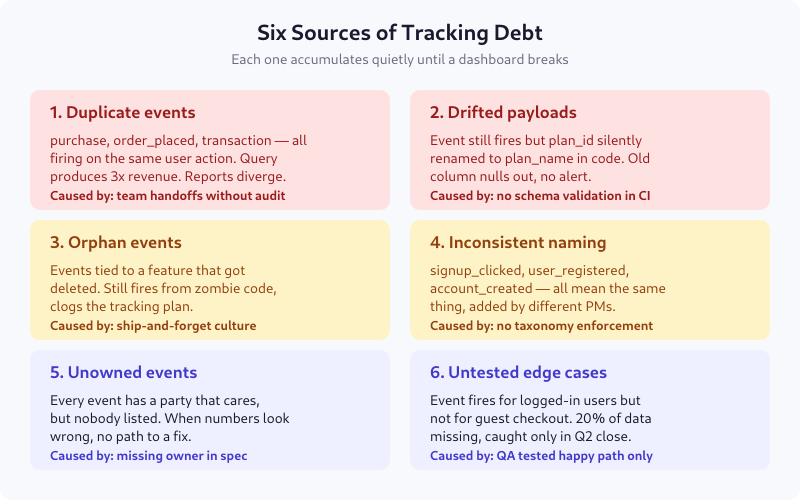
1. Duplicate Events
The most common form. purchase, order_placed, and transaction_completed all fire when a user completes checkout — added at different times, by different teams, for different downstream tools. Revenue queries triple-count until someone notices the discrepancy during board prep.
Root cause: team handoffs without an audit. Prevention: one canonical event per user action, enforced at spec review.
2. Drifted Payloads
The event name stays the same, but the payload quietly changes. plan_id gets refactored to plan_slug in code. Old column nulls out for all new records. Dashboards keep working for historical data, break silently for new data. Usually caught weeks later when a PM asks why premium signups suddenly hit zero.
Root cause: no schema validation in CI. Prevention: contract testing that rejects PRs with payload deltas.
3. Orphan Events
Events attached to features that no longer exist. The feature got killed three months ago; the tracking code lives on in a helper library nobody touched during the removal. The event still fires — from a background refresh, a cached JS bundle, or a mobile app version from 2023 that 5% of users still run.
Root cause: ship-and-forget culture. Prevention: feature kill checklists that include “remove tracking.”
4. Inconsistent Naming
The same conceptual event shows up as signup_clicked (from marketing in 2022), user_registered (from the app team in 2023), and account_created (from billing in 2024). Every dashboard uses one or two of these and silently misses the rest. Conversion rate calculations drift by 20-30%.
Root cause: no taxonomy enforcement. Prevention: mandatory taxonomy review in the spec review process, with a reviewer who owns naming consistency.
5. Unowned Events
Every event has a team that benefits from its data. Half the time, nobody has written down which team. When the event breaks, nobody gets paged, because nobody gets emailed, because nobody is listed. The event fades into the warehouse until it’s discovered as “we have no idea what this is.”
Root cause: owner field missing from the spec. Prevention: no merge without a named owner (not a team mailbox — a person).
6. Untested Edge Cases
The spec says “fires when user completes checkout.” QA tested the logged-in happy path and called it done. Six months later, analytics notices that guest checkout is missing from every report — the event has always been gated on user_id != null. 20% of conversion data, gone.
Root cause: QA tested against the spec, not against every state. Prevention: edge case enumeration as part of Gate 3 of spec review.
The Compounding Problem
Tracking debt compounds because every new tracking request touches the old mess. Adding a new event requires:
- Checking whether a similar event already exists (often yes, often broken)
- Deciding whether to fix the existing one or add a new one (usually adds a new one)
- Building dashboards on top of partially-trusted data (with caveats)
- Explaining to stakeholders why “event X shows Y but report Z shows different”
On two client engagements I’ve measured this directly: teams with significant tracking debt spent 40-60% of their analytics engineering time maintaining or reconciling existing events. Teams that had done a recent debt sprint spent under 20% on maintenance.
The Event Scorecard
Before you pay down debt, you need to know which events are debt. Five yes/no questions per event. Takes about 15 seconds each once you know your data:
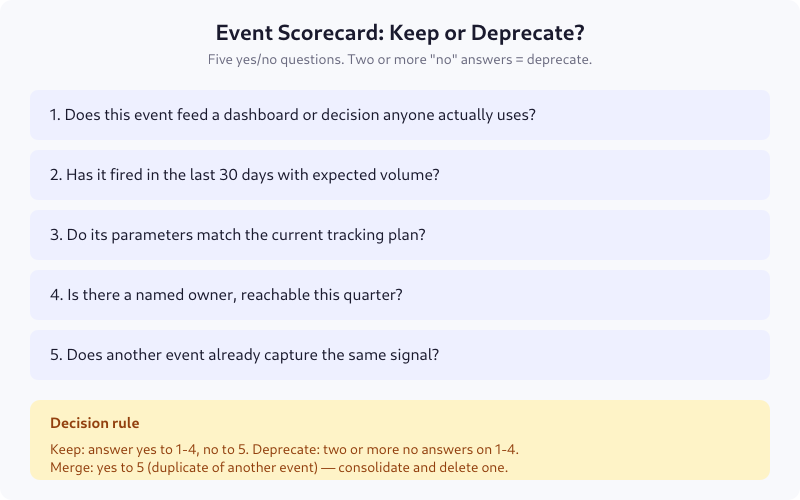
For a typical product with 150-250 events in the tracking plan, this takes about 90 minutes with a spreadsheet. The outcome is an action list: keep, merge, or deprecate.
Typical Audit Results
From seven audits I’ve run since 2022 on clients with 100-400 events:
- 15-25% deprecated outright (orphans, duplicates, dead features)
- 10-15% merged into a canonical event (naming inconsistencies)
- 5-10% silently drifted from spec (payload repair needed)
- 5% unowned — assigned to a new owner during the sprint
The remaining 50-70% stays — those are the events doing real work. The point of the audit isn’t to find “bad events”; it’s to reduce the surface area so the good ones are easier to maintain.
The 2-Week Repair Sprint
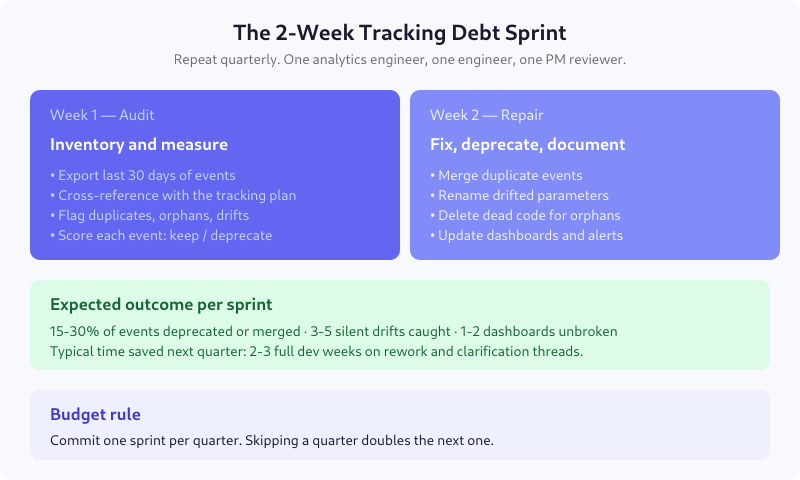
Week 1 — Audit
- Day 1: Export last 30 days of events from the warehouse. Count volume per event.
- Day 2: Cross-reference each event against the tracking plan. Flag missing-from-plan (code ahead of spec) and missing-from-code (spec ahead of code).
- Day 3-4: Run the scorecard on every event. Tag keep / merge / deprecate.
- Day 5: Build the repair ticket list. Group by file or feature so engineering can batch work.
Week 2 — Repair
- Day 6-7: Merge duplicate events. Update downstream queries to read from the canonical event. Keep both firing for one week with a feature flag so you can validate.
- Day 8-9: Rename drifted parameters back to the spec (or update the spec to the current reality — whichever has more downstream dependencies). Backfill old records if feasible.
- Day 10: Delete dead code for deprecated events. Update the tracking plan document. Email owners of newly-assigned events.
Preventing It Next Time
Cleaning up once is valuable. Stopping it from recurring is more valuable. Five habits I’ve seen work:
- Spec review is mandatory. No event ships without a written spec that passes review. See the tracking spec guide.
- Owner field is required. No “team” owners. A named person. Reassign during quarterly review.
- CI validates payload schema. A PR that changes parameter names without updating the spec fails the build.
- Event taxonomy is versioned. When you rename
purchasetoorder_placed, you update a central document with a migration date. - Debt sprint is on the calendar. Once a quarter, non-negotiable. Skipping a quarter makes the next one twice as expensive.
Signs You’ve Paid Down Debt Successfully
- New tracking requests ship in days, not weeks
- Revenue in the warehouse matches the billing system within 1%
- Analytics engineers stop saying “the data looks weird, let me check”
- Stakeholders stop prefacing questions with “assuming the data is correct…”
- Onboarding a new analyst takes hours instead of weeks because the tracking plan is actually readable
FAQ
How often should I run a tracking debt audit?
Quarterly. Teams with mature engineering practices and strict spec review can stretch it to twice a year. Skipping a year almost always means you discover the debt the hard way — during a dashboard rebuild or board prep, when a revenue number is off by 10% and someone demands an explanation by Friday.
How long does a tracking debt sprint take?
Two focused weeks for products with 150-300 events. One analytics engineer audits, one backend engineer executes repairs, one PM reviews deprecation decisions. Larger tracking plans (500+ events) split into multiple two-week sprints, one per feature area, to keep scope manageable.
Do I really need to delete deprecated events, or can I just stop firing them?
Delete them. Leaving the code in place means zombies — a cached bundle, a background refresh, or an old mobile app version will keep firing them for months. Dead code in analytics libraries also adds maintenance burden. A proper deprecation removes both the emitting code and the downstream dashboards that consume it.
What tools help with tracking debt audits?
For most teams, a warehouse SQL editor and a spreadsheet cover 80% of the work. Dedicated tools like Avo, Iteratively, or RudderStack Protocols flag drifts and duplicates automatically — worth it for teams with 500+ events. For smaller schemas, manual audit is faster than tool onboarding.
How do I justify a debt sprint to leadership?
Calculate the time spent per month on analytics maintenance: reconciling numbers, fixing dashboards, answering “why does X look wrong.” For most 50+ engineer teams, this is 10-20 hours per week. A two-week sprint typically reduces that to 3-5 hours per week for at least two quarters. Payback is under a month.
Start Small
If a full sprint is too much upfront, start with the scorecard on your top 20 events — the ones that feed your core dashboards. You’ll probably find 2-4 of them are in worse shape than you thought, and fixing those alone recovers most of the value. Then expand the audit to everything else over the next two quarters. Debt doesn’t have to be paid in one sprint; it does have to be paid.

Lukas Meier
Product Analytics Specialist with 10 years of experience configuring tracking for e-commerce and SaaS products across Europe. Creator of EU-Medin.
more →