

Subscription businesses run on five revenue metrics — MRR, trial-to-paid, expansion, churn, and reactivation — and every one of them is built from the events below. When I joined a Berlin SaaS client in 2023, their billing system fired four events into the warehouse and the product team couldn’t answer basic questions like “what’s our net revenue retention by plan.” The problem wasn’t the metrics; it was the schema.
This reference covers the fourteen subscription events that cover the full lifecycle, what each payload must contain, and which metric each event feeds. Implement all of them and you can answer every finance and growth question from a single event stream.
Who This Is For
You’re running a subscription product — SaaS, streaming, membership, or recurring ecommerce — and your data team keeps reconstructing revenue metrics from billing exports every month. The fix is event-level tracking at the moment state changes, not nightly batch from Stripe or Chargebee. This schema works regardless of billing provider; it’s about what you emit, not what you sync.
The Five Lifecycle Stages
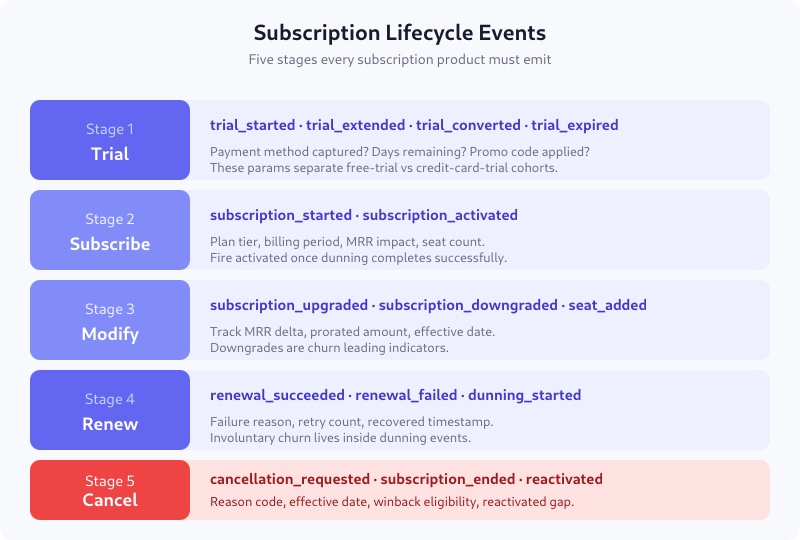
Every subscription moves through these stages. Not every subscription visits every stage — annual plans skip Modify, free plans skip Subscribe — but the schema stays the same so cohort comparisons are apples to apples.
Stage 1 — Trial Events
trial_started
Fires when a user begins a trial, regardless of whether they entered a payment method. Required parameters:
trial_id— opaque identifier for this trial instanceuser_id— who started itplan_id— which plan the trial maps totrial_length_days— usually 7, 14, or 30payment_method_captured— boolean, critical for cohort separationcame_from— landing page or in-app placement
trial_extended
Fires when the trial is extended — by customer success, a promo, or automated logic. Include extension_days and extended_by (user_id of the CSM, or “auto”). These events predict conversion; users whose trials are extended convert at roughly 2x the baseline.
trial_converted
Fires the moment a trial user successfully pays the first invoice. Must include the original trial_id so you can calculate trial-to-paid rate and days-to-conversion.
trial_expired
Fires when a trial ends without payment. Include expiry_reason (no_payment_method / payment_failed / user_declined).
Stage 2 — Subscribe Events
subscription_started
The most important event in the schema. Fires when a paid subscription begins, whether from a trial, a direct purchase, or a reactivation.
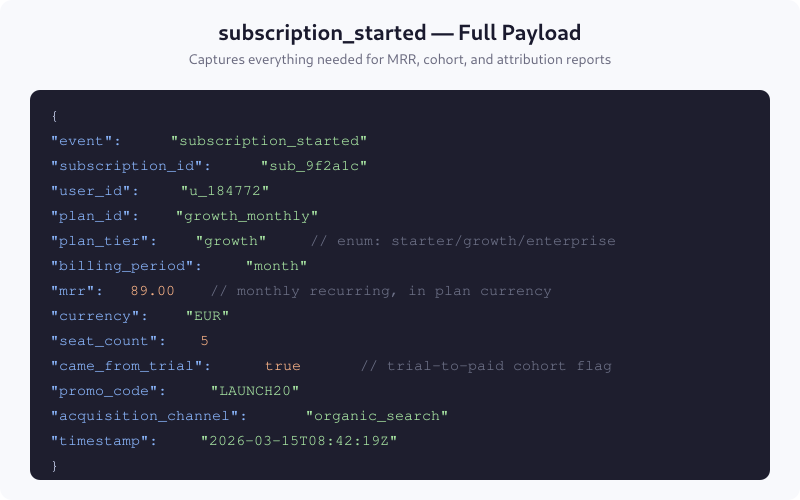
The came_from_trial boolean lets you separate trial-to-paid conversions from direct purchases without a join — critical for acquisition funnel analysis.
subscription_activated
Optional but recommended for high-ticket products. Fires when the first invoice is successfully paid and dunning is clear. For monthly plans, subscription_started and activated can collapse into one event. For annual contracts with net-30 terms, they diverge meaningfully.
Stage 3 — Modification Events
subscription_upgraded
A plan change that increases MRR. Payload must include from_plan_id, to_plan_id, mrr_delta (positive), prorated_amount, and effective_date. The delta feeds your expansion MRR report directly.
subscription_downgraded
Same payload shape, but mrr_delta is negative. Downgrades are the strongest behavioral predictor of churn in the 90 days that follow — treat every downgrade as a customer-success intervention trigger.
seat_added / seat_removed
For per-seat plans. Distinct from upgrade/downgrade because seat changes at the same plan tier don’t move plan_id. Track seat_delta, new_seat_count, and the added_by_user_id (which admin made the change).
Stage 4 — Renewal Events
renewal_succeeded
Fires when a billing cycle renews without intervention. Include cycle_number (1 = first renewal, 2 = second, etc.) and payment_method_age_days. Both are useful segmentation parameters for retention analysis.
renewal_failed
Fires the moment a renewal charge fails. Include failure_reason (card_declined / insufficient_funds / authentication_required / fraud_block) and retry_number. The same subscription may fire this event 3-4 times during dunning before either succeeding or ending.
dunning_started / dunning_resolved
Dunning is the window between first renewal failure and either recovery or cancellation. Fire dunning_started once, dunning_resolved once (with resolution = recovered / cancelled). Involuntary churn is measured from the gap between these events.
Stage 5 — Cancellation Events
cancellation_requested
Fires when a user initiates cancellation, before it takes effect. Required parameters: cancel_reason (from a controlled list), cancel_reason_detail (free text from a cancellation survey), and effective_date. Most subscriptions are “cancel at period end,” so cancellation_requested can fire weeks before subscription_ended.
subscription_ended
Fires when the subscription actually stops billing. This is the event that moves churn metrics. The gap between cancellation_requested and subscription_ended is your win-back window — the time during which save-attempt campaigns can still work.
subscription_reactivated
Fires when a cancelled subscription is restored. Include reactivated_after_days (gap between end and reactivation) and reactivation_channel (winback email, paid ad, self-service). Reactivation MRR is often undercounted because teams fold it into “new MRR” — the came_from_cancelled boolean on subscription_started prevents this.
Mapping Events to Revenue Metrics
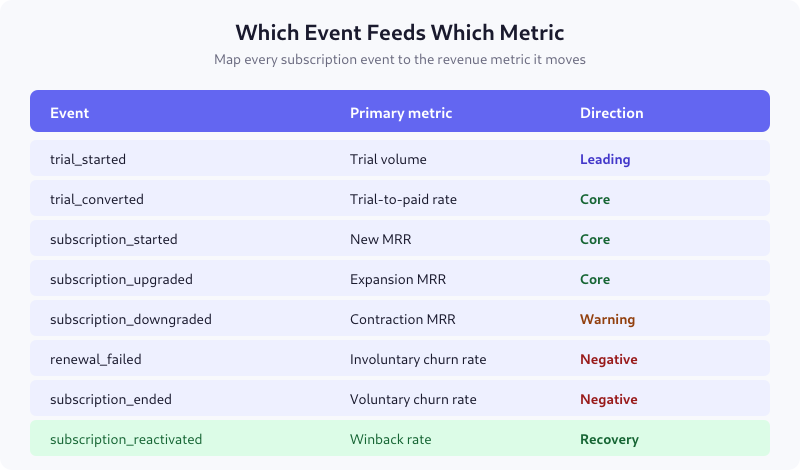
With this schema in place, MRR, NRR, GRR, and ARR are derived from a handful of SQL queries on the event stream — no billing exports needed for reporting. The billing system becomes the source of truth for what happened; the event stream becomes the source of truth for how to interpret it.
Common Parameters Across All Events
| Parameter | Type | Required | Purpose |
|---|---|---|---|
subscription_id |
string | yes | Joins events across lifecycle |
user_id |
string | yes | Account-level aggregation |
account_id |
string | for B2B | Multi-user team context |
plan_id |
string | yes | Pricing cohort analysis |
plan_tier |
enum | yes | Starter / Growth / Enterprise segmentation |
billing_period |
enum | yes | month / quarter / year |
currency |
string | yes | ISO 4217, for multi-currency MRR normalization |
mrr |
number | yes | Current MRR contribution at event time |
timestamp |
ISO 8601 | yes | Event occurrence time (not sync time) |
Data Layer Implementation Notes
Emit these events from your billing system (Stripe, Chargebee, Recurly, or internal), not from your app. Two reasons:
- Source of truth. Billing state changes outside your app (dunning retries, proration, trial expiries via cron). If you emit from the app, you miss everything that doesn’t involve a user click.
- Idempotency. Billing events fire on webhook receipt; your event layer should dedupe on
billing_event_idso retries don’t double-count.
For reference, see how to version this schema without breaking reports when you later add plan tiers or currencies.
Validation Checklist
- Every event has a
subscription_idthat joins to the others - MRR is in plan currency, with
currencyalways set for normalization trial_idflows fromtrial_startedthroughtrial_converted- Downgrades and seat removals have negative
mrr_delta - Cancellation events distinguish
requested(intent) fromended(effective) - Renewal failures include
failure_reason— not just a boolean - Reactivation events are not silently counted as new subscriptions
FAQ
How do I calculate MRR from these events?
Sum mrr from subscription_started and subscription_upgraded, subtract mrr_delta from subscription_downgraded and subscription_ended, for a given period. The event stream gives you point-in-time MRR without reading your billing database. For month-end MRR, filter events where effective_date is within the month.
Should I fire these events from my app or my billing system?
From the billing system. App-level events miss state changes that happen outside user interaction — dunning retries, trial expiries, automatic renewals, proration calculations. Your billing provider webhooks are the only source that catches all five stages. The app can fire supplementary events (plan viewed, cancel modal opened) alongside.
Do I need separate events for annual vs monthly subscriptions?
No. Use billing_period as a parameter on the same event. Separate events multiply your query complexity without adding signal. Just be careful with MRR normalization — annual MRR is annual_price / 12, not annual_price.
How do I handle pauses and plan holds?
Add subscription_paused and subscription_resumed events. Pauses don’t churn MRR immediately but should be tracked separately from cancellations. Include pause_reason and pause_until_date. Reactivation metrics exclude paused-to-active transitions; those are a third state.
What cancellation reasons should I track in the dropdown?
Keep it short: too expensive, missing feature, found alternative, not using it, temporary break, other. Track the enum in cancel_reason and capture free text in cancel_reason_detail. Long lists fragment the data and produce less actionable insight than five clean categories plus an optional free text.
Start With These Three Events
If you’re starting from zero, implement subscription_started, subscription_ended, and renewal_failed. Those three answer “how much MRR did we add, how much did we lose voluntarily, and how much did we lose involuntarily.” The rest build on that foundation — add trial events when you launch trials, upgrade/downgrade events when your plan mix is big enough to matter (usually 500+ customers), dunning events when involuntary churn climbs over 2%.

Lukas Meier
Product Analytics Specialist with 10 years of experience configuring tracking for e-commerce and SaaS products across Europe. Creator of EU-Medin.
more →