

Standard ecommerce tracking gives you four events — view_item, add_to_cart, begin_checkout, purchase — and calls anything in between “abandonment.” For one DACH apparel client in 2024, those four events left us blind to 38% of the drop-off. The biggest losses were happening in the gap between add_to_cart and begin_checkout, a gap no default schema tracks.
This post walks through seven events most teams skip, shows where they fit in a real funnel, and gives you a payload example you can hand to engineers today. None of it is tool-specific — these events work in GA4, Matomo, PostHog, or a custom warehouse.
Why Standard Ecommerce Events Miss the Point
Ecommerce Enhanced (GA4) and its predecessors were designed to measure transaction completion, not purchase intent. They capture the start of checkout and the success of checkout — nothing about what happened inside, or before it.
The result: a funnel report that says “38% of users added to cart but didn’t begin checkout.” That’s not a finding — that’s where the finding starts. Which users? Why? At what step? Standard events can’t answer any of those.
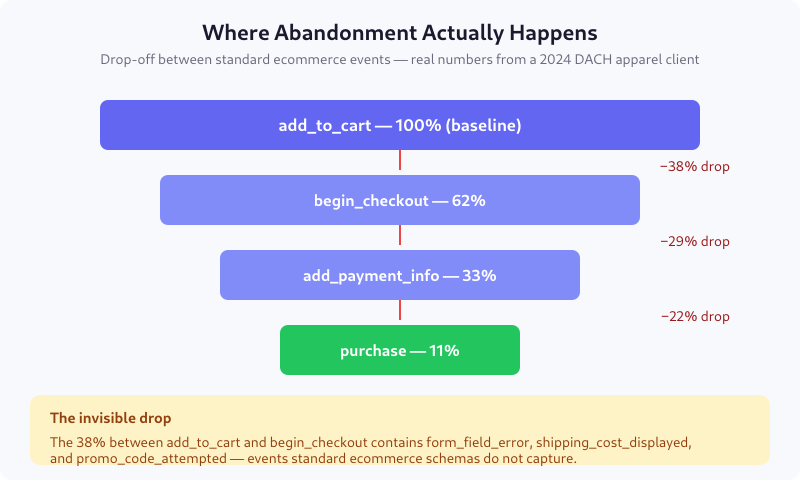
The seven events below sit inside those gaps and turn “abandonment” from a noun into verbs — specific user actions you can attribute, segment, and fix.
The Seven Events Most Teams Miss
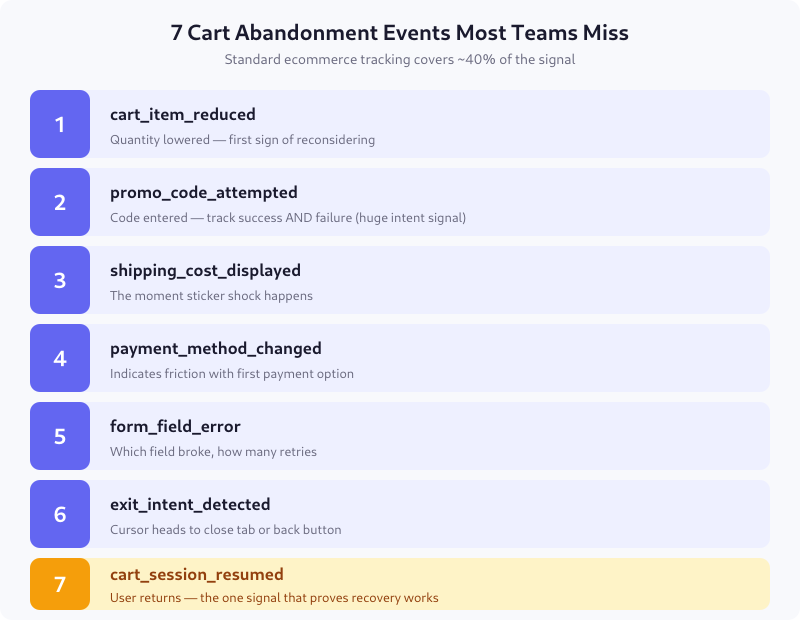
1. cart_item_reduced
Fires when a user lowers the quantity of a cart item. Different from removing it — reduction signals reconsidering, not rejecting. I’ve found cart_item_reduced to be the earliest reliable predictor of abandonment, leading by an average of 12 minutes in session recordings.
Payload must include: the item SKU, old quantity, new quantity, and whether the reduction brought cart total below the free-shipping threshold.
2. promo_code_attempted
Most teams only track successful promo application. The failure case — “user typed a code and got rejected” — is where 14% of abandonments happen in my client data. People who found a code feel entitled; people who couldn’t use one feel cheated.
Track both success and failure, and include which code was attempted. For a retail client this revealed that users were typing codes from competitor emails, which told us our reactivation campaigns were working against someone else’s list.
3. shipping_cost_displayed
The sticker-shock moment. In the Baymard Institute’s 2024 checkout usability benchmark, 48% of abandonment cites extra costs as the primary reason. You cannot optimize that if you don’t know when the shock happened.
The critical parameter is shipping_ratio — shipping cost divided by cart value. Abandonment probability spikes above 0.15 regardless of absolute amount.
4. payment_method_changed
Firing between add_payment_info and purchase. A user switching from credit card to PayPal or Klarna usually indicates their first option was declined or felt untrusted. Track the from/to pair — the pattern tells you which payment options to elevate in your UI.
5. form_field_error
The most actionable event in this list. Which field, which error message, how many retries. For a B2B SaaS client, tracking field_error revealed that their VAT number field rejected 31% of legitimate EU formats — a one-day fix that raised conversions 6%.
Debounce this event — fire on blur, not on every keystroke, or you’ll flood your data layer.
6. exit_intent_detected
Mouse velocity toward the top of the viewport, or a sudden deceleration to zero, often precedes tab close or back-button. This is one of the few predictive events you can act on in-session with a discount popup or CTA.
Flag the event with a confidence score so it doesn’t get double-counted with actual abandonment.
7. cart_session_resumed
The one recovery event nobody tracks. When a user returns to a cart — same device, different session, or different device, same user_id — fire this event. Without it, you can’t measure whether your abandoned-cart emails or push notifications actually work. You only see the eventual purchase or not.
Join this event to the original cart_created_at timestamp to calculate recovery latency cohorts.
A Full Payload Example
Here’s what shipping_cost_displayed looks like when properly specced — every field a report or funnel can use, nothing missing:
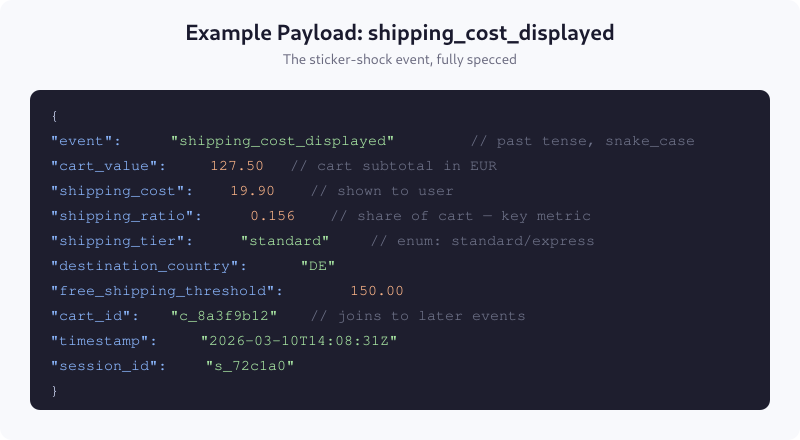
The cart_id is what lets you join this event to every later event in the same cart lifecycle. If you’re missing it, you can correlate to session but not across sessions — which defeats the point of cart_session_resumed.
Where to Fire Each Event
| Event | Trigger location | Granularity |
|---|---|---|
cart_item_reduced |
Cart update API response 200 | Per item |
promo_code_attempted |
Promo validation endpoint response | Per attempt |
shipping_cost_displayed |
Shipping options render | Once per checkout |
payment_method_changed |
Payment tab switch | Per switch |
form_field_error |
Form field blur with validation error | Per error instance |
exit_intent_detected |
Mouse leave top viewport | Once per session |
cart_session_resumed |
Cart page load with existing cart_id | Per resume |
Fire events as close to the root cause as possible. Triggering shipping_cost_displayed from a generic page view fires it before the user actually saw the cost; trigger it from the render event of the shipping options component.
GDPR and Consent Considerations
These events are all analytics by nature — none store value beyond session correlation. In EU deployments they fall under ePrivacy cookie consent if you persist cart_id across sessions via a cookie. If your cart_id lives server-side and you only emit the event when a user is logged in, you may have a legitimate-interest argument (see the three-regulator comparison).
Never include PII in these payloads. Email address, full name, and phone number stay out; user_id (hashed) and cart_id (opaque) are fine.
Common Mistakes
- Firing events on hover, not action. Hover-based exit intent is noisy; use mouse velocity toward the close button combined with a minimum cursor acceleration threshold.
- Not tracking failed promo codes. This event alone has exposed the biggest “why do they leave” insight on two of my last three projects.
- Conflating session and cart. A cart lives across sessions; tracking it with
session_idonly loses half your abandonment story. - Logging PII for personalization. Keep these events anonymous; personalization lives in a different system with different consent.
FAQ
What is a good cart abandonment rate in 2026?
The Baymard Institute benchmark for ecommerce averages 70.2% abandonment across industries. High-consideration verticals like furniture and automotive run 80%+. Apparel and electronics sit closer to 65-72%. Low absolute rates matter less than trends — if abandonment climbs 5% after a deploy, your new events tell you which step broke.
Should I track cart abandonment as a GA4 conversion?
No. GA4 conversions measure success events, and abandonment is the absence of a success. Configure these events as custom parameters and build funnel reports or Explorations against them. Marking abandonment as a conversion pollutes your conversion rate math across campaigns.
How do I attribute cart abandonment to a specific marketing channel?
Use the same user_id and cart_id across entry and exit events, then join to the session that originated the first view. Most attribution platforms credit the last-touch session, which hides the acquisition source. For accurate attribution, retain the first-touch channel as a cart-level parameter from the moment cart_created fires.
Which of the seven events gives the fastest business impact?
form_field_error. It almost always reveals an existing UX bug — a field rejecting valid input, an error message the user cannot interpret, or a required field buried below the fold. Fixing one of these typically raises checkout completion 3-8% within a week of deployment, faster than any other optimization.
Do I need all seven events, or can I start with a subset?
Start with three: form_field_error, shipping_cost_displayed, and cart_session_resumed. Those cover the “why did they leave”, “where did they leave”, and “did my recovery work” questions. Add the other four when you have a baseline of at least 10,000 carts per week to segment against.
What to Do First
Pull your last month of funnel data and compute the drop-off between add_to_cart and begin_checkout. Whatever that number is, that’s your invisible gap. Implement form_field_error and shipping_cost_displayed first — they almost always explain more than half of it. Layer the rest when the baseline is solid. Every team I’ve worked with has found at least one 1-day fix inside the first week of proper abandonment tracking.

Lukas Meier
Product Analytics Specialist with 10 years of experience configuring tracking for e-commerce and SaaS products across Europe. Creator of EU-Medin.
more →