Data Quality Monitoring: Catching Tracking Breakage in Production
 Lukas Meier
·
·
5 min read
Lukas Meier
·
·
5 min read
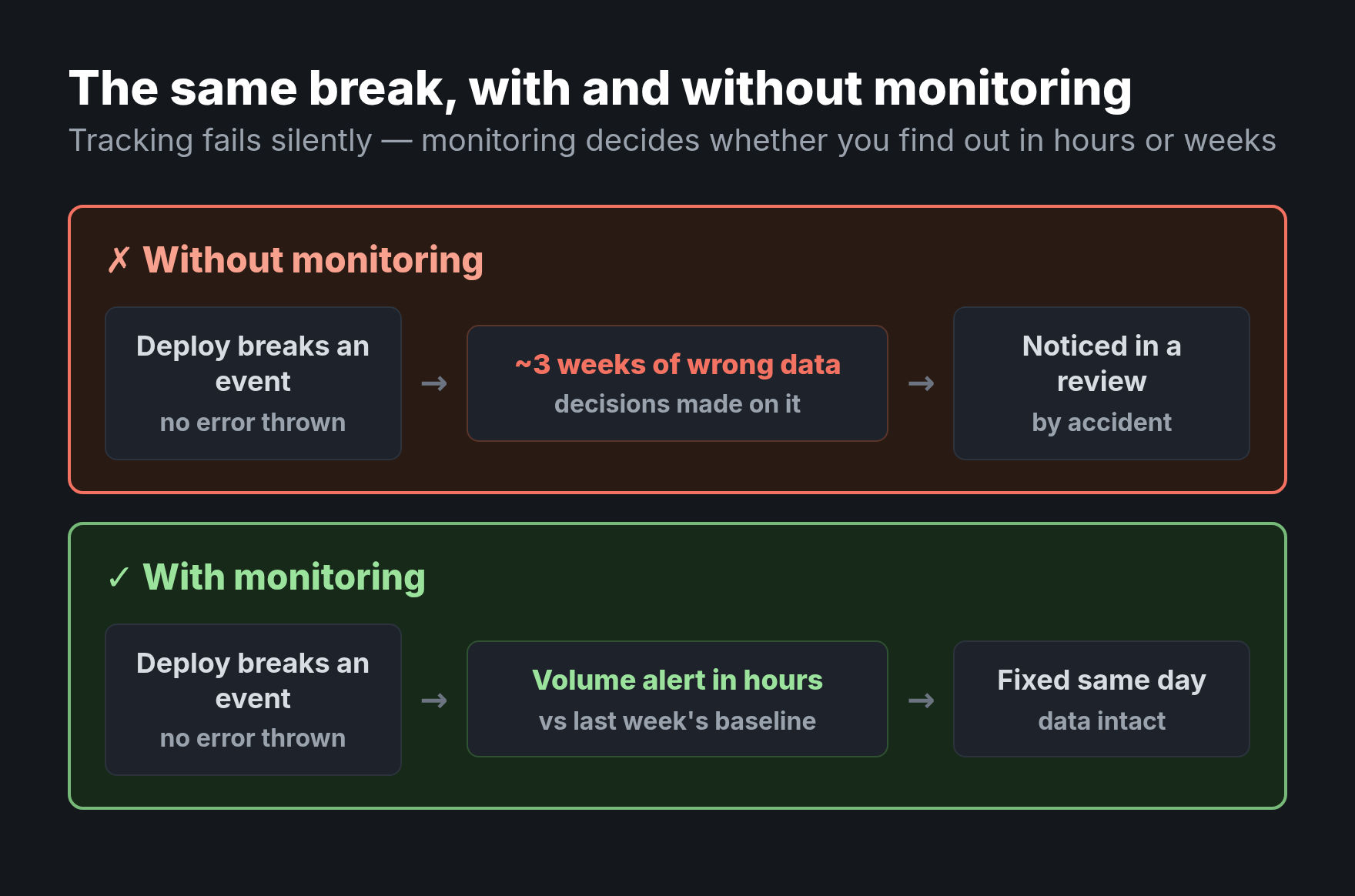
Data quality monitoring is the discipline that separates teams who trust their analytics from teams who discover, three weeks too late, that a deploy silently killed half their events. Tracking doesn’t fail loudly. No error appears, no alarm sounds — the numbers just quietly drift wrong while everyone keeps making decisions on them. Pre-launch QA catches the bugs you can predict. Monitoring catches the ones that arrive on a random Tuesday when someone ships an unrelated change. You need both, and most teams only do the first.
This guide covers why tracking breaks in production, what to monitor, and how to catch breakage in hours instead of weeks.
Why Tracking Breaks Silently
The core problem is that broken tracking looks exactly like real data. A funnel that drops to zero could be a holiday — or a renamed CSS class that killed the click handler. Analytics has no compiler to tell you an event stopped firing. The breakage is invisible until someone notices a number looks wrong, and by then the bad data is baked into weeks of reports.
Production tracking breaks for predictable reasons: a front-end deploy changes a selector, a schema update renames a property, a third-party script updates, or a consent change quietly suppresses events. None of these throw an error in your analytics. That’s exactly why you have to watch for them. Pre-launch validation, like an event tracking QA checklist, can’t help — the break happens after launch.
Tracking never tells you it broke. It just keeps sending you confident, wrong numbers until someone happens to look twice.
The Four Things to Monitor
Effective monitoring watches four dimensions. Each catches a different class of failure.
| Monitor | What it catches | Example signal |
|---|---|---|
| Volume | Events stop, spike, or drop | signup_completed falls 80% overnight |
| Schema | Missing or unexpected properties | plan suddenly arrives null |
| Values | Distributions shift wrongly | Revenue values all become 0 |
| Freshness | Data stops arriving on time | No events for 3 hours |
Volume monitoring is the highest-value place to start — most breakage shows up first as an event count that moves when nothing real changed. Add schema and freshness next, and you’ll catch the large majority of silent failures.
How to Monitor Effectively
Monitoring is only useful if it’s automated and the alerts are trustworthy. Three principles keep it from becoming noise everyone ignores.
Set Baselines, Not Fixed Thresholds
“Alert if signups drop below 100” breaks the moment your traffic seasonally changes. Compare instead against expected ranges — same day last week, trailing averages — so the monitor understands normal fluctuation. An alert should fire on the unexpected, not on every quiet Sunday.
Alert on Anomalies, Tune for Trust
The fastest way to kill a monitoring system is to make it cry wolf. If every minor wobble pages someone, people mute it, and then the real break sails through. Tune thresholds so alerts are rare and meaningful. A monitor nobody trusts is worse than no monitor, because it gives false confidence.
Give It an Owner
An alert that fires into an unwatched channel is theatre. Someone must own the response: triage the alert, confirm the break, and route the fix. Without a clear owner, monitoring decays into a folder of unread notifications. This is the operational sibling of paying down tracking debt — both need a person accountable for the health of the data.
Where Monitoring Fits
Think of data quality as a chain: a clean taxonomy defines what correct looks like, pre-launch QA verifies new events before they ship, and monitoring watches the live stream for everything that breaks afterward. Skip the last link and the first two decay silently in production. Monitoring is what makes the rest durable, turning a one-time validation into an ongoing guarantee.
Common Mistakes
- QA without monitoring. Validating before launch and never watching production is like testing a car once and never checking the dashboard again.
- Fixed thresholds. Static limits drown you in false alarms during normal seasonal swings and miss real breaks during quiet periods.
- Alert fatigue. Too many noisy alerts train everyone to ignore them, so the one that matters gets muted with the rest.
- No owner. Monitoring without a responsible human is just a more elaborate way to not notice problems.
FAQ
What’s the difference between tracking QA and monitoring?
QA validates events before they ship — a point-in-time check. Monitoring watches live production data continuously for breakage that happens after launch. QA catches predictable bugs; monitoring catches the unpredictable ones that arrive with unrelated changes.
What should I monitor first?
Start with event volume. Most silent breakage first appears as a count that drops, spikes, or flatlines when nothing real changed. Add schema and freshness monitoring next to cover the majority of failure modes.
How do I avoid too many false alarms?
Compare against dynamic baselines like the same day last week rather than fixed thresholds, and tune alerts to fire only on meaningful deviations. The goal is rare, trustworthy alerts — a system that cries wolf gets muted and then misses the real break.
Who should own data quality monitoring?
A named person or team — usually whoever owns the tracking plan or the data platform. The point isn’t the title; it’s that someone is accountable for triaging alerts and driving fixes, so monitoring leads to action rather than unread notifications.
The Bottom Line
Data quality monitoring is the difference between catching a broken event in hours and discovering it in next quarter’s review. Tracking breaks silently and constantly in production, and no amount of pre-launch QA can prevent a future deploy from severing it. Watch volume, schema, values, and freshness; alert against dynamic baselines instead of fixed limits; and give the whole thing an owner who acts. Do that, and your analytics stops being a number you hope is right and becomes one you can actually stand behind.

Lukas Meier
Product Analytics Specialist with 10 years of experience configuring tracking for e-commerce and SaaS products across Europe. Creator of EU-Medin.
more →